Select Menu
The Select Menu lets you select specific elements of the circuit. You can access the select actions by clicking on the Select menu in the main tool bar.
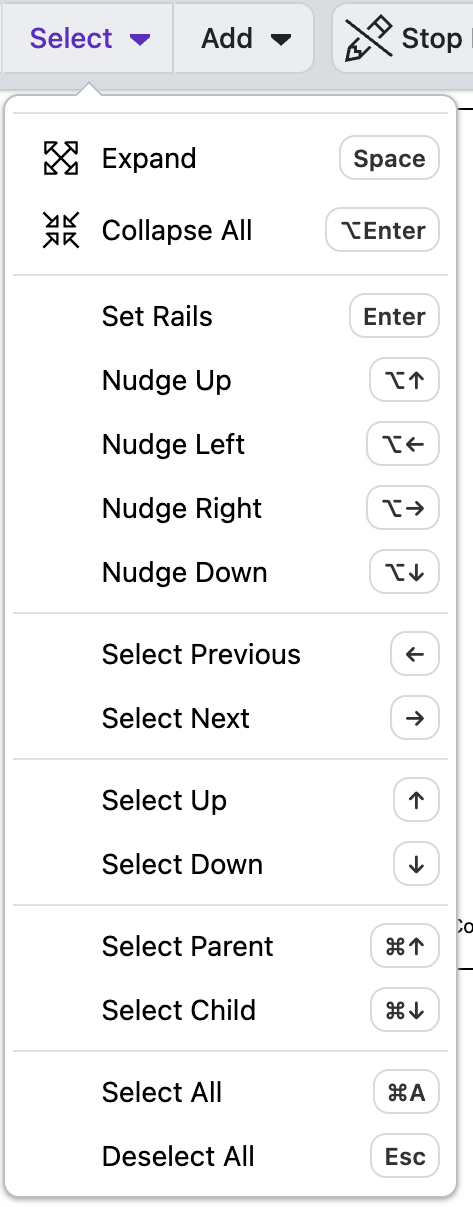
You can select elements directly by clicking on the either the circuit element directly or on the item in the Element Sidebar.
Shift/control Click
Holding shift/control lets you select a range of elements.
Expand/Collapse
Open/close selected routines to show/hide the elements within them.
Expand/Collapse All
Open/close all routines to show/hide the elements within them.
Set Rails
Easily select the target and controls for a selected gate. See more here.
Nudge Up/Left/Right/Down
Nudge selected circuit elements one step in the chosen direction (up/down/left/right). See more details here.
Select Previous/Next
Selects the previous/next element in the circuit as presented on the canvas (left/right)
Select Up/Down
Selects the previous/next element in the circuit as listed in the element sidebar on the left hand side of the screen (above/below)
Select Parent/Child
Select the Parent/Child Routine of a selected element. Select Child selects the first child within the Routine.
Select/Deselect All
Select/Deselect all selected circuit elements
Learn More
Learn about the Circuit Designer's Add actions